I have been playing yet again! I was busy recording tutorials for a workshop to be held on Wednesday when I managed to get distracted! Every day I enjoy reading the posts from DPS and sometimes becoming "inspired" to try one of the suggestions. The simple tutorials I had been recording led me from one topic to another and thanks to that Photography site, I started to think of textures and layering.
I am not sure if my "pupils" would appreciate this sort of manipulation so I am sharing it with anyone who visits my blog instead!
I started out with a blank canvas and using one of the bog-standard weird Photoshop brushes that I had never used before - it looks a bit like a dirty smudge - I made the brush huge and with two dabs created an interesting "background". Then I "colorised" it in Hue and Saturation and then textured it with a very large and deep canvas texture from filters. I created a soft vignette using the Lens Correction filter and came up with this.
Having a texture meant I needed a photo! I dug one out of my collection, it was a rather pleasant, quiet photo of an Australian pelican on the edge of the water. The texture was overlayed and all sorts of blending modes and opacities were tried. When I settled on one combination I liked I then used a mask to clean the texture from the bird.
So far so good - but not really as inspiring as I thought it could have been. What about some text?
Googled "Australian Pelican" and on a scrap of paper wrote down what was written on the site I opened.
I played around with the colour of the text and placed it over the image making it cover the entire picture. This time I used the Multiply opacity.
Once again I erased the layer from the bird and this is what I ended up with.
I quite enjoyed experimenting but I am not sure if this example is dramatic enough. I shall have another go with a different texture and photo and see what I can come up with!
AJ
I would like to show you the variety that is within Australia starting with my own area south of Brisbane. My love is for photography and video. Photoshop is a fun program to use to improve any photo and I have been working with photoshop since version 3 - I now use Photoshop Elements. For video editing I use a variety of programs the main one being Adobe Premiere Elements. I look forward to have you visit occasionally. AJ
Showing posts with label textures. Show all posts
Monday, January 31, 2011
Sunday, July 11, 2010
Using a texture to give mood
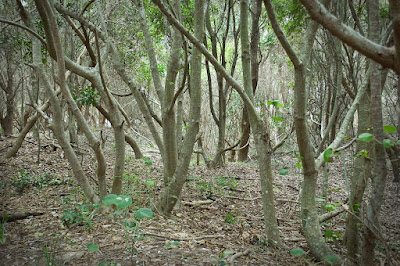
I walked through between a stand of trees to reach a lighthouse today. The trees looked mysterious and foreboding and I thought I would try and capture that dark mood. When I brought the image in to Photoshop it looked interesting but still not as atmospheric as when I aimed the camera at it. The photo is just a photo of a few trees. Yes, you can see that it is dark enough under the trees for no grass or small plants to grow but there is very little about the picture that holds the attention. I added a small amount of vignette to the edges and corners which helped keep the eye inside the picture but still it did nothing for me!

I have not used textures to any extent so this was an experiment to see what would happen.
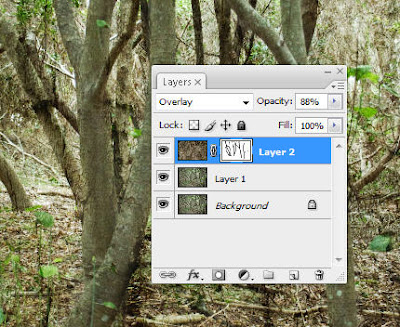
The texture was pasted over the worked picture of the trees and I scrolled through the various blending modes to see what blend worked the best. Up and down through the different blends I went two or three times and the one that suited this picture the best was Overlay. At full strength it was rather too heavy so I reduced the opacity a bit.
Then I felt that the tree trunks were lost in all the pattern and what would they look like if I revealed them a bit more? I applied a mask and used a soft brush at 70% to paint over the major trunks and branches.
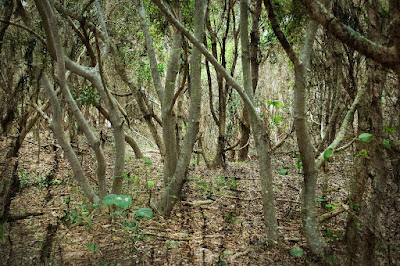
Liking this effect I did no more! It is a temptation to keep on doing more and more to a picture! So the layers were flattened and this is the end result.
Click to see a larger picture
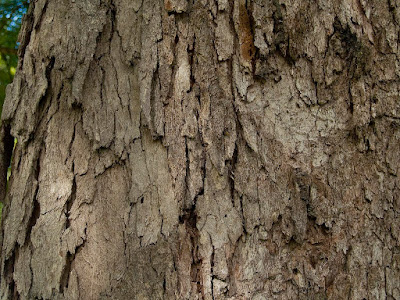
That's when I decided to have a play with one of the texture images I have taken. I selected a shot of the bark of a gnarled and woody Eucalypt that is growing my my own backyard. The vertical patterning would suit the upright nature of my trees, I felt. 
I have not used textures to any extent so this was an experiment to see what would happen.
The texture was pasted over the worked picture of the trees and I scrolled through the various blending modes to see what blend worked the best. Up and down through the different blends I went two or three times and the one that suited this picture the best was Overlay. At full strength it was rather too heavy so I reduced the opacity a bit.
Then I felt that the tree trunks were lost in all the pattern and what would they look like if I revealed them a bit more? I applied a mask and used a soft brush at 70% to paint over the major trunks and branches.Liking this effect I did no more! It is a temptation to keep on doing more and more to a picture! So the layers were flattened and this is the end result.
Click to see a larger picture
Now this image has loads of mood! Much better than the original shot!
AJ
Subscribe to:
Posts (Atom)