Showing posts with label Australian birds. Show all posts

Thursday, June 26, 2014

Definitely a beach day

I learned today why that group of school children were learning about Aboriginal culture in the park near Iluka. Today is Naidoc Day – a day of reconciliation for Aboriginal,Torres Strait Islanders and non indigenous people. (Do a Google search to learn more!) Festivals with demonstrations, stalls and activities were held all over the country to bring people together.
But it wasn't until the day was almost over that I learned about this. So we visited the town of Ballina and wandered around, me with a camera and Colin with patience! I was enjoying the public art along the foreshore.
Here are a few that I managed to “shoot”.


It is appropriate that fish and pelicans are topics for art. This town must have the most recreational fishermen in Australia! Of course, where fish are to be cleaned there are pelicans to clean up the mess! There are real pelicans on every patch of water.

Later in the afternoon Colin and I sat under trees at another little seaside resort called Lennox Heads and while we sat and chatted we were visited by a few different birds.
This is a scrub turkey. Unlike domestic turkeys, this one is not good to eat – an old joke is that you pluck it and put it in a pan with water and a large stone. After two hours cooking, you throw out the bird and eat the stone.
The Mickey Miner is a fun bird that is quite cheeky. It can often be found around picnic tables hoping for a handout! It is a common native bird that can be found almost everywhere around Australia.
The Butcher Bird is just fractionally larger than Mickey Miner (these are the “common” names) and it too loves to beg for treats around picnic tables. This one treated us to a beautiful little song as it tried to tell us that it was absolutely starving, hungry!
Now to share two pictures of the beach at Lennox Heads.
The first camera shot is looking towards the headland and the township.
The second is aimed in the opposite direction. We are into winter (with snow down south) so it would be unusual to see swimmers in the water – mind you the water temperature is actually warmer than the outside air temperature. It is 23 degrees C! Look at all that beautiful sand – the beaches down this way are gorgeous!
Tomorrow Colina and I will head inland away from the beaches. I love the countryside around here. It is very attractive with hills, trees, waterfalls, rainforests, cattle grazing on lush green fields and winding roads.
AJ


Sunday, June 22, 2014

A holiday for Colin

I'm on the move again! This time my trip is to a caravan park only a half day's drive from home. I felt so guilty about having a trip without my husband that I organised a week where we could holiday together. The trouble is, I enjoy going away and seeing and doing new things but hubby would far rather stay home and “potter”!
So we are at South Balina but before we picked up the key to our “superior cabin” we called in to the town of Ballina and walked along a path beside the sea.
At this stage Colin looked happy – he had spotted whales spouting way out to sea and the sun was warm on this mid winter day.
New concrete boulders had been added to the sea wall – we learned this when Colin stopped a local and asked about the white things that we could see out there.
I was busy taking photos of the banksia flowers, the blossoms are at their best at this time of the year, A noisy miner was enjoying the nectar from one of the heads of flowers (each of those thin whiskers is an individual flower) so I just had to include his picture!
We had seen a sign post to the lighthouse and our beach-side walk took us right to it. What a little lighthouse! With all the trees on the beach front and around the lawns of the lighthouse, it s a wonder that the light can be seen by any ships! My photo shows the only clear view of the sea that the lighthouse has.
To reach the place where we are staying tonight and for the next few days, we could either drive a long way before we could reach a bridge over the Richmond River or we could put the car on the ferry. Since I was the driver, I chose the ferry!
Here it is coming in to the Ballina side of the river.
And here is my smart little red road racer, enjoying a cruise on the river!
Once we had unpacked the car and boiled the kettle for a “cuppa” Colin was ready to sit down and relax – but I wanted to go for a walk. That worked! I took my camera and off I went!
I wont bore you with the pictures I took – I like them but they are just plants and trees and river and trawlers sailing out at sunset and that sort of thing. But I will show you This one.
I spotted these tiny flowers and they seemed to have little faces on them. They even look as if they two of them are blowing bubbles!
I was hoping that I would be treated to a spectacular sunset and sat myself down on the river bank and waited – but the clouds fizzled out and it was becoming very evident that all that would happen would be a glow. Realising that I might end up having to walk back along a gravel road in the dark I gave up waiting for the sunset and headed back towards the caravan park. Passing a boat ramp I was thrilled to realise I would get my photograph after all. This is what I captured.
Colin was just beginning to be concerned about my whereabouts when I walked through the door. Then it was time to prepare the evening meal – and the time when I realised that I had forgotten to bring a few essential things that we really needed for cooking! Sigh! Looks like we go shopping tomorrow before we go exploring – or maybe we can do it the other way around!

Sunday, May 25, 2014

Crossing Borders

Cases were packed and rooms checked to see that nothing was left behind and our happy band of coach travellers left the city of Katherine to head West to where the sun sets. Our base for the next three nights will be Kununurra which is in the Kimberley Region.
Our first morning stop was Victoria River, just a service station where we could take a short break and grab a cold drink. I found it so beautiful that I declared that I wanted to come back – and other voices in the group agreed with me. The scenery is just stunning.
This shot was taken of our coach parked at the service station.
Boab trees are found up here and try as I might I could not get a decent shot of one as we were whizzing along the highway so it was with some relief that I found a rather puny one when we were parked! I must try and take a shot of a decent sized one!
When we reached the border between the Northern Territory and Western Australia we pulled up so that we could all take a photo of the sign!
Firie, our driver, told us that he expected his passengers to push the bus over the border 'cos it was a tradition. He was only teasing! Only a few metres from the Border sign was an inspection bay were we had to pull over and declare any fresh fruit, vegetables, nuts and honey.
The best part of the day (every bit of the day was the best part!!) Was what followed. After driving over the dam wall of the Argyle Dam we descended to the banks of the Ord River.
The coach pulled up right at the edge of the bank and our high speed motor boat transport pulled in alongside.
Sometimes we flew like the wind and at other times crept silently on the current but ever second of our four hour trip was exciting. We learned all about the uses and control of the waters from the Argyle Dam, we spotted fresh water crocs, unusual birds that tiptoed on tiny water weeds, a large Jabiru (black and white stork) and the most glorious scenery I have ever seen before.

I complained to one of the other passengers as we were leaving the cruise that my camera was twice as heavy after taking so many photographs! The trip ended after sunset so we drifted along as the sky changed colour and magic happened on the rippling water.
Absolutely exhausted from our wonderful experience we were a quiet bunch of people as we were shuttled to our very posh hotel. A hot shower revived us and we all managed to enjoy a fabulous feast in the large restaurant. We are so lucky – we are staying in the Pinctada Kimberley Grande, what a super place for a coach tour! We feel like royalty!

AJ

Wednesday, February 5, 2014

Creating a lens effect with Photoshop Elements

I was recently asked how to make a small part of a picture in sharp focus when the rest was blurred. Since this effect might come in useful for you to, I thought I would share my method. (There are many different ways of achieving the same thing).
Firstly I found  a clipart image of a magnifying glass and after removing it from its background (using the Magic Wand tool) It was pasted onto the picture I had chosen. The magnifying glass has been moved to cover three birds.
This is how things look in the Layers Palette.
Now I want to select those birds so that they will fit into the magnifying glass. In the Layers Palette I clicked on the eye to the left of the magnifying glass. Doing this makes the layer "invisible" so that you can see what is below.
I then left mouse clicked on the background to make it the "active" layer.
I chose the Eliptical Marquee tool from the tool bar - it may first be seen as a Rectangular Marquee, it is a "multi" button so you have a choice of eliptical or rectangular.
I held down the SHIFT key on the keyboard to enable me to make a circular selection of the birds.
The circle was not in quite the right place so I had to place the cursor INSIDE the circle and move it to where I wanted it. Do not try to grab the edge of the selection or you will create a new selection.
Ctrl +J copied the circle selection and pasted it above the background.
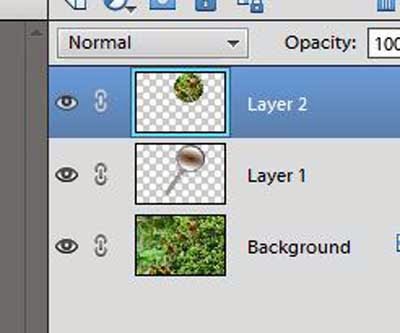
This is how things look in the Layers Pallet now. Notice the "crossed out eye" in the layer that contains the magnifying glass.
I then clicked on the eye to make that layer (glass) visible again and clicked and held the left mouse button down as I dragged Layer 1 so that it was between Layer 2 and Background. The mouse button released when a dark line appeared between layer 2 and Background.
The picture now looks like this (only part of the picture is shown)
The picture does not look very inspiring just yet but we are only half way there!
The next thing I did was select (using the Rectangular Marquee tool ) most of the picture but leaving an even sized border all the way around. Ctrl + J copied and pasted that layer above the Background.
This layer is to be blurred so from the Menu Bar I selected Filter>Blur>Gaussian Blur.
I watched the main picture rather than the preview window as I slide the selection button to the right until I had the amount of blur that I felt was adequate. I needed enough contrast with the sharp image of the birds but not too much that the picture looked really false.
I used the Rectangular Marquee tool again to draw around the blurred layer and went to Edit >Stroke (Outline) Selection to put a white line around that layer. (If I tried to apply a Stroke without using the Selection tool, the stroke was blurred too.
Next the bird layer was selected (click that layer in the Layers Palette) and re-sized to fit inside the round shape of the magnifying lens (Ctrl +T gives the Transform tool) To create a more natural look I went to Layer>Layer Style>Style Setting>Glow.
This makes the glass look as if it is convex (slightly rounded)
And here is the final image.
If you are observant you will notice that the handle of the magnifying glass is in a different position, I rotated it a little before I flattened the image! The "Transform" handles on that layer are still showing!
AJ


Friday, January 18, 2013

Laughter in the air

Yesterday when walking with my dogs, one of them pounced on a baby lorikeet that had crash landed on the ground. (I rescued it and took it to a wildlife hospital where it is doing well - no injuries!) So I should not have been surprised when, on hearing the tell-tale sound of a Kookaburra throatily telling the other birds to leave him alone from his perch on a tree root that my faithful black retriever dashed to my rescue in the frantic hope that this time he would be allowed to keep his catch. However I had staggered out there with tripod, camera and long lens so was not exactly pleased with his helpfulness!
The Kookaburra was not an injured bird so it was able to fly up into a branch of the fire-wheel tree - Samson was hot on his heels so before I could even call the dog to leave it alone, the bird had flown! Kookaburras are actually a bird that will allow you to get quite close to them, usually. I followed my feathered quarry into a fenced area - being sure to close the gate with Samson on the other side! Unfortunately  now the bird was quite sure that I wanted to catch it and only very briefly did it sit in range of the camera. Luckily for me that one photograph turned out quite reasonable - except that it was a tad dark.
With the darkness corrected.
Since many people do take photographs with the main subject either silhouetted or a bit darker than liked, I will show you what I did to end up with this picture so that you too can fool everyone into thinking you take wonderful shots every time!
To begin with I used the quick selection tool in Photoshop Elements and dragged it over the branch and the bird.
You can see from the red arrows how I dragged the tool down and across the bird and the branch, Some of the background was selected too but I then held down the ALT key and with the same tool slowly and carefully dragged over those areas to de-select them.
Now I needed to brighten the bird and branch (You can now see that they do look a bit dull and need a "lift")
I then opened Levels (Ctrl + L) and moved the mid tones and the highlights sliders. The mid tones (centre slider) was moved the most.
The bird's eye looks way too dark so I zoomed in and I could see that there were catch lights there but quite faint. I took the Dodge tool and gave one smooth brush stroke over the lighter part of the eye just to brighten it a little. I didn't want to over do it or it would have looked as if the picture had been taken with a flash.
There was one more thing to do before I flattened the image and that was to add a little sharpening. I usually use Smart Sharpen and these are the settings that worked for this image (each image needs a different amount).
You can tell by the enlarged image in the sharpen window that the Kookaburra is still on a separate layer, this is why there is that grey mesh all around the bird. The background image does not show up in the sharpen window. From the closer shot you can see the bright bit in the eye that I had made a little brighter.
The image was then flattened and my hand written signature put on the bottom - and a simple "Stroke" that makes a bit of a border. Then it was saved with a new name.
I always keep my original photographs in a folder that is saved not only to my computer but also to an external hard drive. The originals are like my "negatives" I will be able to return to them in years to come and with my newly acquired skills make and even better job of readying them for printing. I do keep the corrected ones on the external drive too - but separate from the originals.
AJ


Tuesday, December 18, 2012

Back to sharing and teaching

At long last I have returned to my blogspot to write and share some of my pictures and experiences with anyone who cares to take a look. For the past month I have been posting pictures on a daily basis to Google+ which is an open networking/social media site. Although I take photographs of many different things I chose to share birds and landscapes. All well and good - the Google+ interface allowed the photographs to be viewed in good quality and I was uploading mine at 2000 pixels on the largest side so they did look good in spite of the 72 dpi resolution! However I have chosen to stop this daily dabble and return to my blog page - because I like to write. Reactions in Google+ are two words long, usually and there are no questions or reactions to anything that is written so VERY frustrating.
I know, there are no questions or reactions to anything written in these pages either - but at least I can enjoy the presentation myself - and look back on earlier postings and share the stories with my email friends. I do hear about my postings via email and that way I can interact about the topic that was covered or give additional information to anyone who has not quite understood a tutorial.
I will now try and add something to these pages each day. It may be long it could be very short, it may be about something done ages ago or it may be a travel diary as I explore the world. This is my page and I will be as inconsistent as I am in real life!
Barking owl - Ninox connivens
One thing I will attempt to avoid is personal stuff! Breathe easy! You will not see much of the family here - but you may glimpse my husband occasionally since he always accompanies me on my trips. He sometimes gets in the way of the camera!!!
On a recent visit to Currumbin Sanctuary on the Gold Coast of Australia, I took along my Nikon D90 and had the sense to take the 55-300mm lens along as well as the standard 18-50mm, so I was able to use the full zoom (300mm) to isolate the birds from their backgrounds. You can tell from the patterning in the background to the Barking Owl that this is a captive bird - what you cannot tell is that heavy mesh was between the camera lens and the bird. The spaces between the wires was about 3cms so it was not possible to thread the lens through the gaps - also there was a no-go space between the cage and the footpath. That is why manual focus had to be used, if I had used automatic focus this would be a photograph of the wire with a dark shape behind it. Deliberately focusing on the birds made the near wires evaporate and the narrow depth of field I had chosen made sure that the wires in the background were not so visible either.
If you are using a compact camera that has a good zoom on it, you too would be able to do this - but you will need to check in your camera manual on how to manipulate the focus. If you are using a tripod (highly recommended for this sort of shot) you will have time to tweak the focus. A bird, such as an owl, keeps quite still for a long period of time. You just have to wait for the eyes to open!
AJ

Friday, August 10, 2012

Does the camera lie?

Sometimes a shot requires a much better background for it to be a satisfying shot. Take this one for instance.
With a little work this same bird looks more at home here.
To make these changes required only a few easily learned processes
  1. Selection
  2. Clean up using a mask
  3. Cloning
  4. Selecting layers to be worked.
Selection can be done in so many ways - my preferred method is with the Lasso tool.
I made a rough selection of the bird and then pressed Ctrl+J which is the short-cut for "Copy and Paste".
To make the cleaning up of the selection really clear I then filled the background with a colour - If I had used either black or white I would have run into problems with finding the edges but with a colour I had no difficulties at all.
I then clicked on the bird layer and created a mask (small button on the Layers Palette) and with a soft edged brush and black as the foreground colour I painted away the wall and back of the chair that were still showing around the edges of the bird.
Then I created a background.
Here is the original shot I took for the background.
The stick looks good - but it is too high up in the picture. the left hand side of the picture is too bright and draws the eye over to see the fence and post in the background. Two things to fix up here. The stick first.
Just as with the bird I drew around the stick with the lasso tool and Ctrl+J to make a copy. In the Layers palette (shown on the right of this picture) you can see the stick as a layer - but looking at the picture you cannot see any difference at all.
With the move tool I dragged the stick closer to the bottom of the picture. Again a mask was created and the surrounds to the stick cleaned away. I did not want the original stick to be still in the picture so I then Clicked on the background and used the Stamp or Clone tool to sample in different places and replace the stick with leaves.
Another image was opened and part of that was selected to be used to fill the light area of background behind the stick.
To select this a rectangular selection tool was used and I clicked "Copy" (Ctrl+C)
I then opened the background picture I was working on, clicked on the background (in the Layers Palette) and clicked "Paste" (Ctrl+V)
The bird picture was opened again, the layer highlighted and selected (Ctrl+A). Double click on the background to open it again and Paste the bird and put him on the branch.
It all sounds mighty complicated but look at the list of processes that were used - only four!
So does the camera lie? Did I see a bird on the back of a chair on my veranda or did I see it in the garden?
AJ

Tuesday, August 7, 2012

Sounds amazing

We occasionally get a visit from a kookaburra as it checks out the boundary to its territory. When it finds an intruder there is a little shouting for a while. I was able to record this snatch of the conversation.

The accompanying animation was created from seven photos (I copied the head and pasted on one picture) I have not discovered how to upload sound only to this blog so I have been forced to create a video. It does make the sound belong to something - so I guess making a video of the sound isn't such a bad thing!
The pity is that the picture is not correct for the sound - there were three kookaburras all sitting on this same branch and I spotted them from the house and managed to get the sound recorder out there but not the camera. When a Kookaburra calls, it points its beak upwards.
AJ

Thursday, July 26, 2012

The Little Wattle Bird

Again the Little Wattle bird has been singing out to be noticed and this time I had the foresight to put on the 50-300mm lens so that I could get a bit closer to it.
Mind you, I do get rather frustrated when the bird keeps to the opposite side of the tree to me! When I am gardening it is right above my head and bold as brass. It just doesn't want the camera!

Now as I said in a previous article, I cannot see a "wattle" maybe it is hidden under feathers! I love the way the bird is stretched out and alert on the top of the garden stake! It had seen another bird in the garden.
AJ