Saturday, January 30, 2010

Tossing a basket

It is amusing what people will do to win a fluffy toy.
At the recent celebrations for Australia Day one stall holder had a very simple idea for making money. All he had was one basket ball and one hoop and a dozen or more stuffed toys as rewards for the person who could throw accurately. At three dollars for three throws I think he would have been comfortably off by the end of the day! There are not too many people who can throw a ball into a circle only fractionally larger than the ball! For me it would have been cheaper to buy the toy! My left eye is my strongest eye and I am right handed so I have never ever been accurate at aiming a bow and arrow, hitting a cricket ball or throwing a basket ball! At least I can aim the camera!
AJ

Thursday, January 28, 2010

Characters of Australia

F6.3 shutter speed 1/500 taken at 200mm with 18 - 200 mm Tamron.
There are wonderful shots to be taken when people are not posing. Somehow the naturalness of a turned head or slumped shoulders conveys such a lot about the person.
Two of the pictures included today are of men busy at the Australia Day event.
The first is of an axeman preparing his blade for the competition. He was seated in the shade with the sun just catching his hat and his shoulders but as the shot was taken in RAW I was able to pull up the dark shadows in ACR without blowing out the highlights. The fact that you cannot see this man's eyes does not worry me, the body language shows the concentration that would be in the eyes. The success of a woodchop depends very much on the keenness of the blade. This axe is a lethal weapon!
F 6.3 Shutter speed 1/500 also taken at 200mm with 18-200mm Tamron lens.
My second character is a smithy, he was working at an old forge so the heat must have been quite unbearable. He looks exhausted and he also looks quite typical of the men of the bush. A true outback character. I caught this shot of him as he turned from winding the handle of the mechanical bellows that blew air under the burning coals to heat the metal he was working on.
Finally a fun shot of a collection of mini characters who were only 30cm tall ....
F 6.3 Shutter speed 1/400 at the full tele end of the 18-200mm Tamron lens.
The piglets were all dressed up in their racing finery for a very special race that they ran once every hour. A dish of milk was placed at the end of the run which was arranged in the same way as the run we have to take to check in at the airport before flying anywhere! The piglets would be released from a small fenced off end of the run and since they had done this a few times already they knew there was a reward at the end of the trail so off they would trot with the audience calling out to their chosen pig but occasionally they would all turn around and head back the way they came! Everyone, including the piglets, enjoyed the fun!
AJ

Wednesday, January 27, 2010

More from Australia Day

I had such a wonderful time with the camera at the Australia Day festivities that I just have to share some of the shots I took! OK, So I am a show off!
My first picture is of a real Scottish Piper. F 6.3 at 1/320 sec 28mm ISO 200

I heard the sound of bagpipes playing and went off in search of the source of the sound. I didn't have far to look as he was just around the corner of the main building having what he thought was a quiet practice! Bagpipes, quiet? Anyway, I greeted him and remarked that the tune he just played wasn't very Scottish. He asked me which one and I said "Marching to Georgia" and wasn't that an American tune? He agreed but went on to tell me that the tune was used with Scottish words "Hey, the Billy boy" (I think that is what he said!) and gave me the interesting story about the song. Having befriended this uniformed man I asked him if I could take a picture of him at the top of the steps and he willingly obliged. Just as well because I had to ask him to move twice because I didn't want the building behind him, I wanted to get the sky as his background. I think the shot shows his strength of character and his stance conveys that defiance that I always associate with the Scottish attitude to the over-lord approach by the English.

Yesterday I showed the flags lined up waiting to be raised at the start of the Australian Citizenship ceremony. The flags were to be raised by four people who had been given special awards for their contribution and work with the community. Before the raising of the flags the MC told all the people waiting to swear their oath as Australian Citizens to turn to the people on either side of them and shake their hand and say "G'day". My next shot is of two of the people who had been awarded Citizen of the Year for the Gold Coast.


F6.3 at 1/320 sec 65mm ISO 200

The 17 year old had been awarded Young Gold Coast Citizen for his work as a member of the Junior Council program and the man with the wonderful whiskers was awarded Gold Coast Citizen of the Year for his work with trouble youth.

The third shot in this collection is of an Axeman. The Woodchop has been an Australian event since the beginning of settlement. There are three different sorts of events with the timber (in this event it is Ironbark) held upright as in this shot, horizontal and the axeman stands on the timber and at the top of a three metre pole where the axeman has to cut chips into the pole, put a plank in the chip, stand on the short plank and cut the next chip and put a plank in and so on until he is high enough to be able to cut the block of wood at the top of the pole.


This shot was also shot with the same Aperture of 6.3 but a higher speed (it was so bright!) 1/500 sec and using the telephoto end of the lens - 120mm and the same ISO 200.

I wanted to be able to freeze the chips of wood as they flew from the axe - this is why I used such a high shutter speed.

AJ

Tuesday, January 26, 2010

Australia Day 2010

Today is a very important day for Australians, it is a day of unashamed exhibitions of patriotism and pride. There are celebrations the country over and many of us make these celebrations a not-to-be-missed occasion.
My photo was taken from behind a crowd of people waiting to make their promise of allegiance to the country at a Citizenship ceremony.
The flags in front of the crowd are all Australian flags, the one on the left is the Australian flag, the centre one is the Queensland flag (The Gold Coast is in the state of Queensland) and the flag on the right is the Aboriginal flag. The Australian aboriginals do not consider themselves “Australians” so they march under their own flag. (Something that I do not condone – but even if politicians did not like it they are unable to say so for fear of being labelled racist)
I watched as the flags were raised and a volley of shots was fired by six men dressed in the uniforms of military forces that are now no longer in existence and singing of the National Anthem before moving away to see some of the other activities on show - more pictures and stories about the day tomorrow!
AJ

Sunday, January 24, 2010

Using a texture over a picture

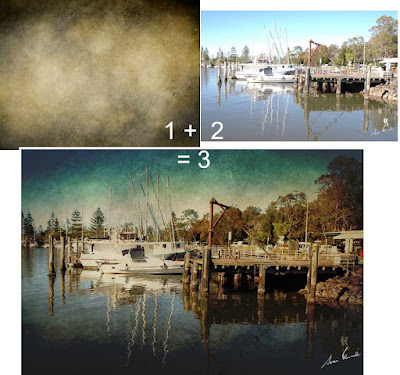
Just for fun and because it is Sunday and I have time to myself (wonderful) I downloaded a texture from one of the contributors at Flickr "skeletalmess" and had a bit of fun applying it to one of my uninspiring photographs to see how it would change it.

To combine two images it is important to first have them the same size.

With both the texture and the picture open in Photoshop I clicked on the texture to make it the selected image. Then I clicked on Image>Image size to bring up the resizing box. No alterations were done here, what I did next was to click on "Windows" in the menu bar and down at the bottom were listed the two images that were open in Photoshop. I clicked on the obscure name of the boats tied up at the wharf (letters and numbers assigned by the camera) and then clicked on OK in the Image Size box (which was still open).

The texture suddenly changed in size. It became very much bigger. In fact it became exactly the same dimensions and pixels per inch as the other picture.

Now I selected all (Ctrl +A) to select the texture and then copied it (Ctrl +C).

Clicked on the other picture and pasted the texture (Ctrl + V).

Of course, now I could see nothing except the texture. The image had been completely covered.

In the Layers palette I clicked on the blending modes ("Normal" is the default setting) and started to scroll through all the different blending options, pausing when I found one that I liked or found interesting.

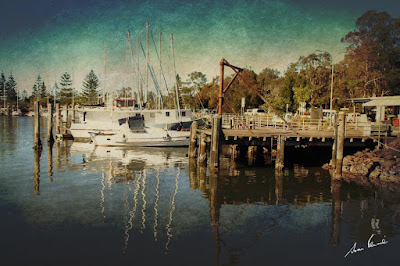
Eventually I returned to Linear Burn and then reduced the opacity to 70%. Now this is what I finished up with.
Click here for a larger image. If ever there is a highlighted word in my text it will link to a larger picture.

After this experience I spent quite a bit of time downloading several textures to my HD for future play!

AJ

Saturday, January 23, 2010

doggy haircut

Lucky Byron had a visit to the poodle parlour where he could catch up with all the other shaggy dogs in the neighbourhood a couple of days ago.
When I walk Byron past dogs in the street he just has to reach out and see if he knows them but when I take him for a haircut you would think he was unaware of the other dogs. It is really strange - he loves the girls who do the clipping and he loves the fuss they make of him and he loves the treats they give him afterwards but he could not really care less about the other dogs no matter how large or small!
So our super woolly boy is now slim and sleek and able to sneak through the long grass without touching it!
We took him (and Samson) to the park - and as you can see from the photos, the fellows responsible for the upkeep had been a little slack! Great conditions for paralysis ticks!
Throughout the park are jumps and ramps and poles for playing with the dogs - and they love it when I run with them and make them jump over things. The jumps are only knee height and the run is not as fast as it could be (my tiny grandkids could beat me!) but the dogs have fun and I get a bit of exercise too!
Did I tell you that Byron has celebrated his tenth birthday? He is a senior citizen now!
AJ


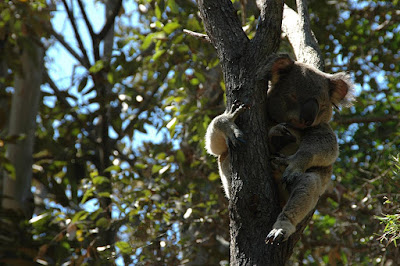
A Koala uplift

Looking through my photos to see what I had, I came across some delightful pictures of a sleeping koala. It isn't only the tourists who love these delightful and harmless Australian treasures, we locals can't get enough of them either!
But this shot needed a little work done to it to lift it out of the doldrums.
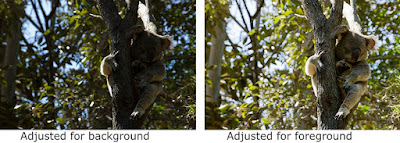
The photo was taken with the Nikon 70s and was in RAW format as well as jpg so I was able to open the picture twice in the Abobe RAW workplace. The first time I opened it I corrected the exposure for the background and the second time I increased the exposure, added some fill light and a little more black to correct the most important part of the photo, the koala in the fork of a tree.With both pictures open in Photoshop, I clicked on the image with the koala and its tree corrected. Then I roughly selected around the tree and occupant and Ctrl+C to copy the selection.
Then I clicked on the other image with the darker background and pasted (Ctrl + V) the koala selection onto it. Using the magnify tool I selected around the back foot of the koala to zoom right in to that part of the animal. Then the "V" key on the keyboard was tapped to make sure I did not have any selection or crop tool selected ("V" gives you the "Move" tool) and reduced the opacity to about 30% in the layers palette. Using the arrow keys on the keyboard I moved the koala layer until the hook on the toe was exactly over the one on the image below.Next I clicked on the Add Layer Mask in the layers palette, Chose a soft edged brush and painted away all the bright leaves from around the tree trunk and koala.
Once I was satisfied that there were no tell-tale bright bits to show that I had copied and pasted I "applied" the mask and then sharpened the koala and tree using "Smart Sharpen".
A blank new layer was added above the koala and selecting a shadow colour from the tree branch I painted over the very bright branch behind the koala's head to dull it down. I reduced the opacity and changed the blending mode to "darker color" and when I felt nothing more was needed the three layers were flattened.
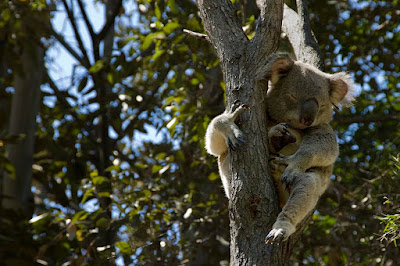
and here is the final image.The camera may not lie but it doesn't necessarily see what our eyes see. Our eyes will compensate for the shadows while our cameras cannot without compromising the colour and shading of the surrounds - so with the tools that Photoshop has given us we can now produce what we know we saw!
AJ